
Bookkeeping still done manually in Excel
Accidentally overwritten formulas, sprawling sheets, and different file versions between people make the numbers hard to trust. One small mistake can ripple through the whole report unnoticed.
 Integrated Odoo Module
Clean, automated bookkeeping — always real-time.
Automate your financial record-keeping — from customer invoices and vendor bills to bank reconciliation — and get accurate financial reports whenever you need them. Because accounting is unified with sales, purchasing, and stock, the numbers in your books always reflect the real state of the business, not a recap that's already stale.
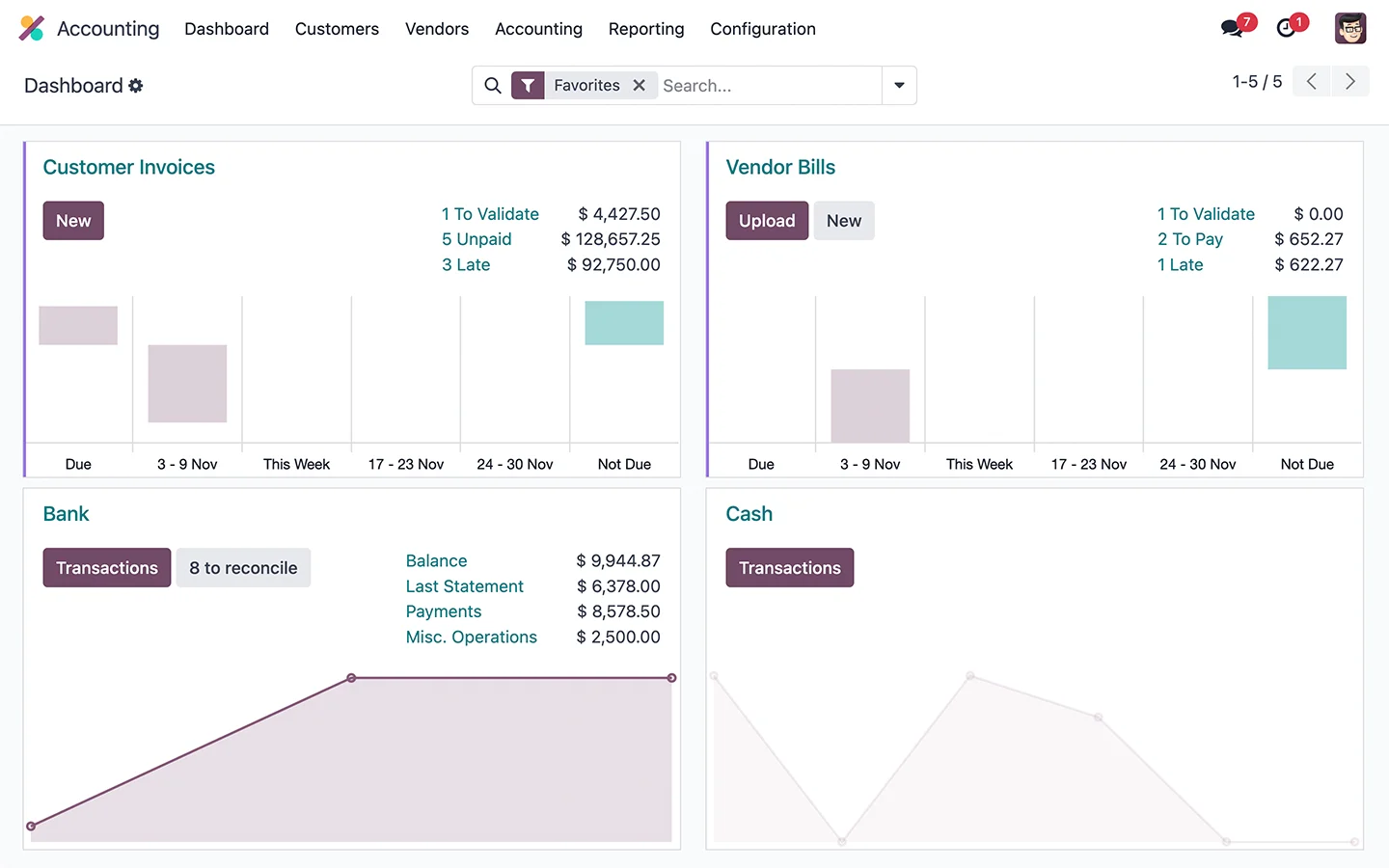
For many businesses, accounting is still a race against the clock. Data is re-entered from receipts, bank lines are matched one by one, and reports land weeks after the month ends — by which point the information is too late to guide a decision. While transactions are few, a spreadsheet feels fine. But as volume rises, branches multiply, and tax obligations grow more complex, the cracks show: hard-to-trace discrepancies, exhausting month-end closes, and an owner who never truly knows today's cash position. What makes it harder is that finance is often the last department to know what's happening on the ground — sales have shifted, prices have risen, stock has run low, yet the books only catch up long after. By the time the report is ready, the important decision has already had to be made without adequate data. Here are the problems we most often see before a company tidies up its accounting in Odoo.
Accidentally overwritten formulas, sprawling sheets, and different file versions between people make the numbers hard to trust. One small mistake can ripple through the whole report unnoticed.
Matching hundreds of bank lines to internal records by hand is exhausting and error-prone. As a result, book balance and bank balance often fall out of sync at month-end.
Without a system, invoices go out late and receivables aren't tracked. Money that should already be in the bank instead sits with customers because nothing flags the due date.
P&L and balance sheet only arrive well after the month closes. Owners decide based on the past instead of the current picture they actually need.
VAT and withholding tax are calculated by hand near the deadline, with the risk of miscalculation or misfiling. Preparing data for e-invoicing and reporting becomes an emergency every month.
Sales, purchasing, and stock data live in a different system from the books. The finance team re-keys numbers, and cross-department discrepancies become hard to avoid.
A question as simple as how much cash we have today and what's due this week requires a recap first. Cash-flow planning becomes guesswork rather than data-driven.
Every month-end turns into overtime: hunting for discrepancies, matching balances, tidying journals. The team's energy goes to admin, not analysis.
Manual entry opens the door to typos and double postings, and without a clean audit trail, tracing a single transaction back to its source can take hours.
Without inventory value connected to the books, cost of goods is estimated roughly and true margin is blurry. A company may feel profitable when margins are thin, or vice versa, with no data it can trust to set prices.
For businesses with several legal entities or branches, combining reports means copying from many files and manually aligning formats. It's slow, error-prone, and delays the whole-of-business picture owners need to decide.
Odoo Accounting turns bookkeeping from a deadline chase into a process that runs automatically in the background. Most journal entries create themselves from real activity — when a sale is recorded, its invoice and revenue recognition follow; when goods are bought, the bill and inventory value are posted. Bank lines are pulled and matched automatically, tax is computed as transactions are created, and financial reports are available in real time with no recap needed. Because every module lives in one database, there's no more mismatch between sales, warehouse, and finance records. The accounting team shifts from re-keying data to reviewing, analyzing, and advising. Just as important, the system grows with your business: start from simple bookkeeping and invoicing, then add fixed assets, budgets, multi-branch, and multi-company consolidation without switching platforms. All the controls — access rights, approval flows, and audit trails — are built in to keep data accurate and accountable as your company scales. Here are the core capabilities.
Sync bank lines via connection or import, and let Odoo match them to invoices and payments with smart rules. All that's left is to verify, not to match one by one.
Create and send professional invoices, automate due-date reminders, and track each customer's payment status. Receivables become visible and get collected faster.
Tax is calculated automatically as transactions are created, based on a configuration that follows local rules, so preparing data for reporting and e-invoicing is far tidier and no longer last-minute.
P&L, balance sheet, and cash flow stay up to date with no manual recaps, with drill-down from summary figures all the way to the original transaction.
Upload or email bills, and the system reads the data automatically and prepares a draft entry — cutting manual input and typos.
Track the age of receivables and payables in one view, know who to chase and which bills are due, so cash flow is managed deliberately.
Manage fixed assets and run automatic depreciation on the chosen method and schedule, with no separate manual depreciation table.
Set budgets, compare actuals against plan, and split costs by project, department, or branch via analytic accounts to see true profitability.
Run multiple entities or branches in one system, with separate books and consolidated reports, plus cleanly recorded inter-company transactions.
Record transactions in multiple currencies with automatic exchange rates and gain/loss adjustments, ideal for businesses trading across borders.
Set approval rules for bills, payments, and journals by amount or type, so spending stays controlled and separation of duties is preserved without slowing daily operations.
Customers can view their invoices and payment status online, while vendors track their bills — cutting back-and-forth questions and speeding up payment settlement.
Odoo Accounting's strength lies in how it captures finance as an automatic consequence of business activity, not as a separate record-keeping chore. Here is the financial flow inside the system — from the first transaction to audit-ready reports — which we tailor to your chart of accounts and approval process.
Sales and purchase orders from the Sales and Purchase modules automatically create customer invoices and vendor bills, with the right accounts and taxes — no double entry.
Invoices go to customers with automatic reminders, while vendor bills can be read from documents via OCR and verified before being approved for payment.
Incoming and outgoing payments are recorded and linked directly to the related invoice or bill, so customer and vendor balances stay accurate.
Bank lines are pulled or imported, then matched automatically to recorded payments. Reconciliation models handle bank fees and recurring items with ease.
VAT and withholding tax are computed automatically on each transaction. The system summarizes tax obligations per period, easing reporting and e-invoicing prep.
Every transaction produces the correct journal entry automatically and flows into the general ledger. No more scattered or forgotten manual journals.
P&L, balance sheet, cash flow, and tax reports are available anytime, always reflecting the current state, and traceable down to the source transaction.
With data kept tidy all month, closing becomes a quick verification. A complete audit trail makes internal and external reviews straightforward.
With complete, tidy history, the team builds the next period's budget, compares actuals to plan, and analyzes cost and profitability trends — turning historical data into better decisions going forward.
This page centers on the Accounting app, but its greatest value comes from finance being directly connected to all operations in one Odoo database. You can start with accounting and invoicing, then add other modules as needs grow. Here are the apps we most often implement together with Accounting.
The core of the books: chart of accounts, journals, ledger, bank reconciliation, tax, assets, and complete financial reports.
Invoice creation and delivery, payment reminders, and receivables tracking for healthier cash flow.
An automatic source of customer invoices; every completed sales order flows into the books as revenue.
An automatic source of vendor bills; purchase orders and goods receipts are recorded as payables and costs.
Feeds accurate inventory valuation and cost of goods sold (COGS) straight into the journals, with no manual calculation.
Recording and approval of employee reimbursements that post to the books once approved.
Bill digitization via OCR and orderly archiving of financial documents that are easy to find at audit time.
Customizable real-time financial reports and KPIs, plus spreadsheet-based analysis straight from live data.
Legally valid e-signatures for contracts, payment approvals, and financial documents, speeding up processes with no print-and-scan.
Illustrative: a trading company keeping books in Excel with 2 finance admins
A trading company recorded all its finances in spreadsheets built up over years. Every month-end, two finance admins spent more than a week copying receipts, matching bank lines row by row, and assembling reports. Sales and stock data lived in another system, so revenue and cost figures often didn't match the books. Near tax deadlines, the team worked overtime calculating VAT by hand, and the owner never had a truly current cash picture to make decisions with. When they wanted to assess profitability by product line, the data simply wasn't available — everything was mixed into one big summary that was hard to break down. Every bit of growth added administrative load rather than clarity.
We implemented Odoo Accounting connected to the Sales, Purchase, and Inventory modules as a single source of truth. The chart of accounts was restructured to be clean and meaningful, sales and purchase transactions now automatically create invoices, bills, and journals, and bank lines are matched with smart reconciliation rules. Tax is computed automatically on each transaction so reporting prep is no longer sudden, and analytic accounts were added so profitability by product line is clearly visible. Historical data and opening balances were migrated, the team was trained to read real-time reports and run the close, and we supported them until the new process became a genuine habit.
Some of the questions prospective clients ask us most about implementing Odoo Accounting & Finance — from tax compliance and data migration to security and integration. If yours isn't answered here, our team is happy to help via a free, no-obligation consultation.
Yes. The chart of accounts, journals, and reports can be configured to follow accounting practice in Indonesia. We help set up the account structure and report formats to match your business and reporting needs.
Yes. Taxes such as VAT and withholding tax are computed automatically on each transaction per your configuration, and the system summarizes obligations per period so reporting prep is far tidier.
Invoice data in Odoo can be prepared for e-invoicing needs, and integration can be configured to fit your tax workflow. We help tailor it so tax-reporting prep runs efficiently.
Yes. We help migrate opening balances, master data, and important transaction history from Excel or a legacy system into Odoo, so you start with complete, continuous books.
Yes, and that's the key advantage. Sales orders become customer invoices, purchase orders become vendor bills, and inventory value flows into the books — all with no double entry and no cross-department mismatch.
Bank lines can be pulled via connection or imported, then Odoo matches them automatically to payments and invoices with smart rules. You simply verify the result rather than matching by hand.
Yes. Odoo supports multi-company and multi-branch in one system, with separate books, inter-company transactions, and consolidated reports to match your org structure.
Yes. Because each transaction immediately creates a journal entry, P&L, balance sheet, and cash flow always reflect the current state, and you can trace any figure to its source transaction.
No. Odoo's interface is designed to be approachable for finance staff, and we provide role-based training plus concise documentation. Most teams are comfortable within days.
Odoo provides role-based access control, approval flows, and audit trails. You decide who can view or approve what, so financial data stays protected and accountable.
Yes. You can set budgets, compare actuals against plan, and split costs by project, department, or branch via analytic accounts to see true profitability.
Our estimate covers both implementation services and the Odoo license for your number of users, with no hidden fees. We explain the breakdown up front so you can budget with certainty.
It depends on the complexity of the chart of accounts, integrations, and data migration. After an initial analysis, we provide a clear, measurable timeline so you know when the system will be ready.
As an Odoo Gold Partner, we map your finance process, design the right chart of accounts and approval flows, migrate data, train the team, and support you after go-live so the system is genuinely used and delivers results.
Very much so. Odoo records transactions in multiple currencies with automatic exchange rates and computes currency gains and losses separately, so reports stay accurate even when you trade with cross-border suppliers and buyers.
Odoo shows your cash, receivables, and payables position in real time, with projections based on invoice and bill due dates. You can see when money comes in and goes out, so cash planning becomes data-driven rather than guesswork.
Yes. Each asset can be linked to a depreciation method and schedule, and Odoo generates the depreciation journals automatically each period — with no separate, error-prone manual depreciation table.
Through the Expenses module, employees submit costs with proof, managers approve, and once approved the cost posts to the books and is ready to be paid — all neatly documented.
Yes. Beyond standard reports, you can build custom reports and dashboards per department, project, or branch using analytic accounts and spreadsheets straight from live data, matching the indicators that matter most to you.
Yes. Data is stored centrally with regular backups and role-based access control — far safer than Excel files scattered across many computers with no clear backup.
Yes. You can grant limited, role-appropriate access to an accountant or auditor, so they can review data and the audit trail directly in the system without swapping files back and forth.
Get a free consultation for your needs. We'll help map out the right modules and give you a clear cost estimate — no commitment.