
Long queues at peak hours
Slow registers and convoluted steps make customers wait too long when it's busy. Patience runs thin, and some abandon the purchase simply because the line is too long.
 Integrated Odoo Module
A fast checkout connected to your entire business.
Serve customers faster with a modern POS that keeps running even when the internet drops, and automatically connects to stock and accounting. Every checkout instantly updates inventory and the books, so there's no more end-of-day manual recap — and you can monitor every branch from one place, in real time.
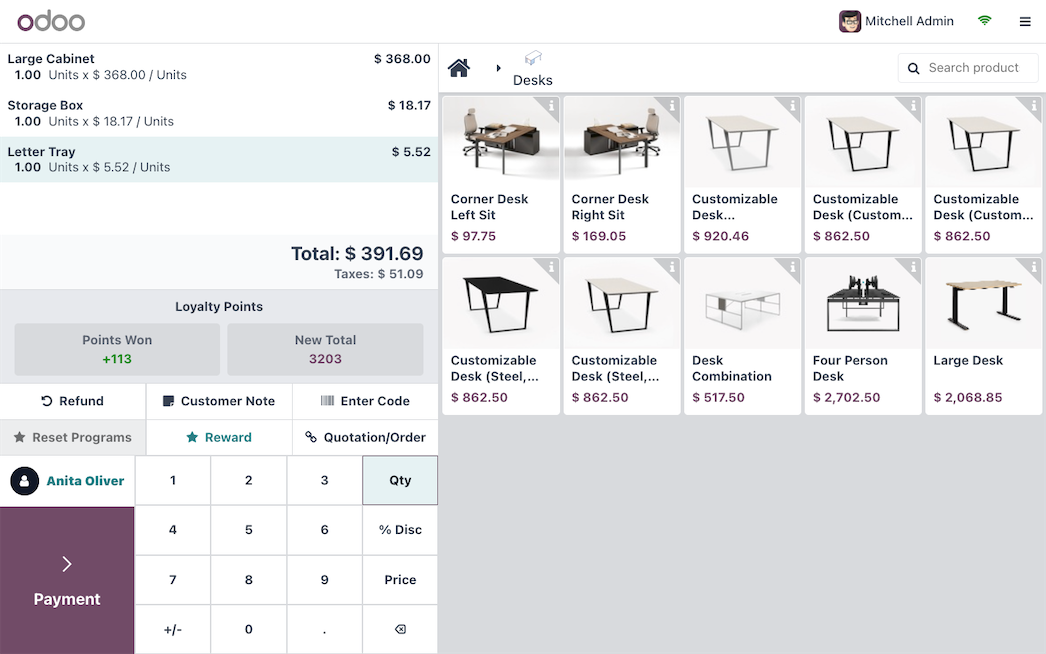
The checkout is where customers meet your business directly — and where first impressions, service speed, and data accuracy are tested every day. Many retail and F&B businesses still use old cash registers or standalone apps, separated from stock, accounting, and other branches. As a result, sales data must be recapped by hand, checkout stock often doesn't match the warehouse, and owners only learn how the business did the next day through a report that's already stale. As branches multiply, the problem compounds: prices and promos are hard to standardize, cash between shifts is prone to discrepancies, and there's no whole-of-business view of which branch is profitable. In retail and F&B, where margins are thin and turnover is fast, small register leaks and recurring stock gaps can quietly erode profit all month long. The costliest part isn't even the money lost — it's decisions made late because the data was never truly current. Here are the problems we most often see before a business moves to an integrated POS in Odoo.
Slow registers and convoluted steps make customers wait too long when it's busy. Patience runs thin, and some abandon the purchase simply because the line is too long.
Each branch keeps its own data, so the owner must gather and merge reports by hand. The full picture always arrives late and is prone to miscounts.
Because the register isn't connected to stock, items that are actually sold out still get sold, or vice versa. This gap frustrates customers and throws off the books.
A register app that fully depends on connectivity goes down the moment the internet hiccups. At peak hours, even a brief outage can mean lost sales and customers walking away.
Without neatly recorded cashier sessions, end-of-shift cash discrepancies are hard to trace and leaks are hard to prevent. Owners can only guess what really happened on the floor.
Transactions pass by without recognizing who the customer is, leaving no basis for loyalty programs, targeted promos, or relationships that drive repeat purchases.
Changing a price or running a promo means updating each register one by one. Errors and inconsistency between branches are almost unavoidable.
Counting the drawer, matching it to sales, and logging discrepancies is done by hand every shift — tiring, slow, and error-prone.
Owners learn today's performance only tomorrow, after data is recapped. Decisions on stock, staff, and promos then trail behind reality.
The physical store and online channels run on different systems, so stock, customers, and reports don't unify — causing double sales and an inconsistent experience.
Handwritten orders passed to the kitchen are slow and error-prone. Without table management and a kitchen display, rush hour turns into chaos.
Odoo POS is a modern web-based register that keeps running even when the internet drops and unifies with your entire operation. Every transaction immediately reduces stock, posts to accounting, and recognizes the customer if registered — with no double entry and no manual recap. Because all branches share one database, prices, promos, products, and reports are managed centrally, while owners monitor each outlet's sales in real time from anywhere. Whether for a retail store or a restaurant, this POS can be tailored — from a simple fast register to a full system with table management, kitchen display, loyalty, and online-sales integration. Most importantly, the system grows with your business: start with one outlet, then add branches, online channels, and loyalty programs without switching platforms or re-migrating data. Here are the core capabilities.
Process transactions in seconds via an intuitive touchscreen that's easy for new cashiers to learn, so queues move fast even at the busiest hours.
The POS keeps serving transactions even when the connection drops, then syncs automatically once it returns — sales never stop over a network issue.
Accept cash, cards, QRIS, and e-wallets on one screen, even split payments, with everything recorded automatically into the books.
Every sale automatically reduces stock in the relevant warehouse and creates the accounting journal, so inventory and financial reports stay accurate with no recap.
Recognize customers, grant points, coupons, and targeted promos, and run membership programs to drive repeat purchases and raise basket size.
One system for retail stores and F&B, complete with table management, bill splitting, and sending orders to the kitchen for restaurants.
Manage many outlets from one backend: products, prices, and promos are standardized once, while each branch's reports are available separately or combined.
Each shift is opened and closed as a recorded session, with opening cash, sales, and discrepancy neatly captured — easing reconciliation and reducing leaks.
Set various pricing, discount, and promo rules by branch, period, or customer, then apply them automatically at the register with no manual math.
For restaurants, lay out tables, take orders per table, and send them straight to the kitchen display (KDS), keeping the order flow fast and error-free.
Connect receipt printers, cash drawers, barcode scanners, scales, and customer displays to form a complete, reliable checkout station.
Monitor revenue, best sellers, cashier performance, and per-branch trends in real time through dashboards, so decisions can be made today.
Odoo POS's power isn't just speed at the register — it's what happens automatically behind it. A single tap at checkout triggers a chain of updates — stock, accounting, loyalty, and central reports — that legacy systems handle manually and in silos. Here is one transaction's flow, from the cashier opening a shift to data landing in central reports, which we fully tailor to your business type, hardware, and each branch's process.
The cashier opens the shift by recording opening cash. Every transaction during the shift is tied to this session, easing tracking and reconciliation later.
Products are picked via touchscreen or scanned by barcode, with the right variant and price. The total is computed automatically in an instant.
Discounts, coupons, and customer points are applied automatically per the active rules, with no need for the cashier to calculate or remember running promos.
Customers pay with cash, card, QRIS, or e-wallet — even split across methods — and the system records everything for the books automatically.
The receipt is printed or sent digitally, and if the customer is registered, the transaction adds to their history and points for the loyalty program.
Sold items immediately reduce the relevant warehouse stock in real time, so availability stays accurate across channels and branches.
For restaurants, orders are sent straight to the kitchen display per station, speeding up service and reducing mistakes during rush hour.
At end of shift, the session is closed by counting the drawer and matching it to sales. Discrepancies are logged automatically, easing audits and preventing leaks.
All transactions flow to the central backend, forming real-time sales, stock, and finance reports the owner can view from anywhere.
This page centers on the Point of Sale app, but its real power comes from the register being directly connected to stock, finance, customers, and online channels in one Odoo database. No more checkout system as a separate island. Here are the apps we most often implement together with POS to form a complete retail and F&B operation.
The checkout core: fast sales interface, cashier sessions, payments, promos, plus retail and restaurant modes.
Provides real-time stock to the register and reduces it automatically on each sale, keeping availability accurate across branches.
Receives sales, tax, and payment journals from the POS automatically, so the books stay current with no manual recap.
Unifies physical-store sales with online orders under one catalog and stock, for a consistent omnichannel experience.
Manages points, coupons, and promos applied automatically at the register to drive repeat purchases.
Table management, floor plans, and kitchen display for F&B, speeding up the order flow from register to kitchen.
Stores customer data from transactions to build relationships, segmentation, and better-targeted promos.
Triggers automatic reordering when outlet stock runs low, so best sellers don't run out.
Real-time sales reports and KPIs per branch and product, customizable for cashiers, managers, and owners.
Illustrative: an F&B chain with 5 outlets
An F&B chain ran five outlets on different, disconnected register apps. Each night, every outlet's manager sent a sales recap via chat, and head office merged them by hand the next day — always late and often mismatched. Ingredient stock wasn't tracked in real time, so popular menu items suddenly ran out, while promos launched by head office were applied inconsistently across outlets. When the internet acted up, registers went down and transactions stalled, and cash discrepancies between shifts were hard to trace. Because customer data was never captured, the owner also had no way to recognize loyal customers or run a loyalty program that could lift repeat visits.
We implemented a centralized Odoo POS across all five outlets, connected to Inventory, Accounting, and a loyalty program. Registers now run online or offline, syncing automatically when the connection returns. Products, prices, and promos are managed once at head office and applied uniformly everywhere, table management and a kitchen display speed up service, and every cashier session is recorded for easy reconciliation. Ingredient stock is connected so low items are flagged earlier, and the owner monitors every outlet's performance in real time from a single dashboard.
Some of the questions prospective clients ask us most about implementing Odoo Point of Sale — from offline mode and QRIS payments to multi-branch and F&B needs. If yours isn't answered here, our team is happy to help via a free, no-obligation consultation.
Yes. Odoo POS is built to keep serving transactions when the connection drops, storing data locally and syncing automatically once the internet returns. Sales don't stop over a brief network glitch.
Yes. Odoo POS supports various payment methods including cash, cards, QRIS, and e-wallets, even split payments. Configuration is tailored to the payment providers you use.
Yes. Because POS is unified with Inventory, every transaction immediately reduces stock in the relevant warehouse or outlet in real time, so availability stays accurate and sold-out items aren't sold.
Yes. You manage products, prices, and promos centrally, while each outlet has its own cashier sessions and reports. Owners can view each branch's performance and the combined picture from one dashboard.
Very much so. Odoo POS has a restaurant mode with table management, floor plans, bill splitting, and a kitchen display (KDS), so the order flow from register to kitchen is fast and error-free.
Yes. Every POS transaction creates sales, tax, and payment journals automatically in accounting, so the books stay current with no end-of-day manual recap.
Each shift is recorded as a cashier session with opening cash, sales, and a closing count. Discrepancies are immediately visible and traceable, making leaks easier to prevent and audits transparent.
Yes. With eCommerce integration, the same stock and catalog serve the physical store and online, so omnichannel sales stay consistent and the same item isn't sold twice.
Odoo POS can run on a computer, tablet, or dedicated device, and connects to receipt printers, cash drawers, barcode scanners, scales, and customer displays. We help pick hardware that fits your needs and budget.
Yes. You can run points, coupons, member discounts, and targeted promos applied automatically at the register, helping recognize loyal customers and drive repeat purchases.
Yes. Odoo's POS interface is intuitive and touch-based, so new cashiers get comfortable quickly. We also provide training and support so the transition is smooth.
Master data such as products, prices, and customers can be migrated into Odoo, so you don't start from zero. Important history can also be considered based on your reporting needs.
Our estimate covers both implementation services and the Odoo license for your number of users, with no hidden fees. We explain the breakdown up front so you can budget with certainty.
It depends on the number of outlets, devices, and integrations needed. After an initial analysis, we provide a clear, measurable timeline so you know when the system will be ready on the floor.
As an Odoo Gold Partner, we map your checkout and branch operations, configure the right POS, hardware, and integrations, migrate data, train cashiers and managers, and support you after go-live so the system is genuinely used and relied upon.
Odoo POS supports returns and refunds right at the checkout screen, with stock automatically restored and clean posting to accounting. Access rights can be set so only certain cashiers or managers may process them.
Yes. Products with variants like size, color, or toppings can be picked quickly at the register, each with its own price and stock, so large catalogs stay easy to manage without slowing transactions.
Yes. A cashier can hold an order and serve another customer, then resume it later. This helps in both retail and F&B when a customer is still choosing or waiting.
Yes. With scale integration, products sold by weight are calculated automatically against a per-unit price, ideal for grocery, produce, or meat shops.
You can define what each cashier may do — for example give discounts, process refunds, or open the drawer — so control is preserved and responsibilities are clear at every outlet.
Yes. One outlet can have several checkout points sharing the same products, stock, and customers, each with its own session and reports, ideal for large stores or busy restaurants.
Yes. Receipt format, store information, and tax calculation can be configured to your business needs, so the receipt customers receive looks professional and compliant.
Through real-time dashboards and reports, you can see best sellers, busiest hours, cashier performance, and branch comparisons. These insights help you decide menu, staffing, stock, and promos more precisely.
Yes. With pricing rules and pricelists, you can set different retail and wholesale prices on the same product, so one system serves both customer types without complexity.
Get a free consultation for your needs. We'll help map out the right modules and give you a clear cost estimate — no commitment.