
Projects often run over deadline and budget
Without clear planning and visibility, projects slip the schedule and costs balloon. Problems only surface once it's too late to fix without a loss.
 Integrated Odoo Module
Run projects on time, collaboratively, and measurably.
Plan, manage, and track your team's projects — from tasks and timesheets to resource allocation and billing — on one collaborative workboard. Because projects are connected to sales and accounting, every hour and cost is recorded against the right project, so you know exactly which projects are profitable, which are slipping, and where to improve.
For project- and services-based businesses, profit isn't decided when the contract is signed — it's decided as the project is run. Yet this is where many companies lose control: tasks scatter across chat and spreadsheets, it's unclear who's doing what and how far along, and team hours aren't tidily logged so some are never billed. Managers spend their time asking around to learn progress, deadlines slip because workload is invisible, and at the end of a project no one truly knows whether it made money or lost it. As the number of projects and team members grows, this chaos compounds, and growth actually erodes margins through invisible waste. What makes it hard is that most of this leakage never appears as a single number — it spreads as unbilled hours, repeated revisions from miscommunication, and deadlines that quietly slip. When it's all added up, a project that looked profitable on paper turns out to have barely made anything. Here are the problems we most often see before a team tidies up its operations in Odoo.
Without clear planning and visibility, projects slip the schedule and costs balloon. Problems only surface once it's too late to fix without a loss.
Work is divided over chat, email, and spreadsheets, so it's unclear who owns what and how far along it is. Some tasks get done twice, others are forgotten.
To learn a project's status, managers must ask around one by one. There's no whole-of-project view, so problems and blockers are detected and handled late.
Team hours aren't tidily logged or are filled in later from memory. As a result, some billable time never makes it onto an invoice — revenue quietly lost.
Without a view of who's doing how much, some are overloaded while others idle. Scheduling becomes guesswork, and burnout and delays are hard to avoid.
Because cost and revenue aren't tracked per project, no one knows which projects truly make money. Pricing and priority decisions are made without a basis.
Discussions, decisions, and key files spread across many apps. When needed, context is hard to find, and new members take a long time to grasp a project's history.
Billing by logged hours or milestone achievement by hand is often late or miscalculated, slowing cash flow and creating disputes with clients.
When a project spans several departments or outside parties, without one shared place information breaks up, responsibility blurs, and the ball often drops between teams.
Every project is run differently depending on who leads it, so quality is inconsistent and knowledge doesn't accumulate into a better way of working.
Compiling status and progress reports by hand eats time, and by the time it's done the data has changed — so decisions are often made on a stale picture.
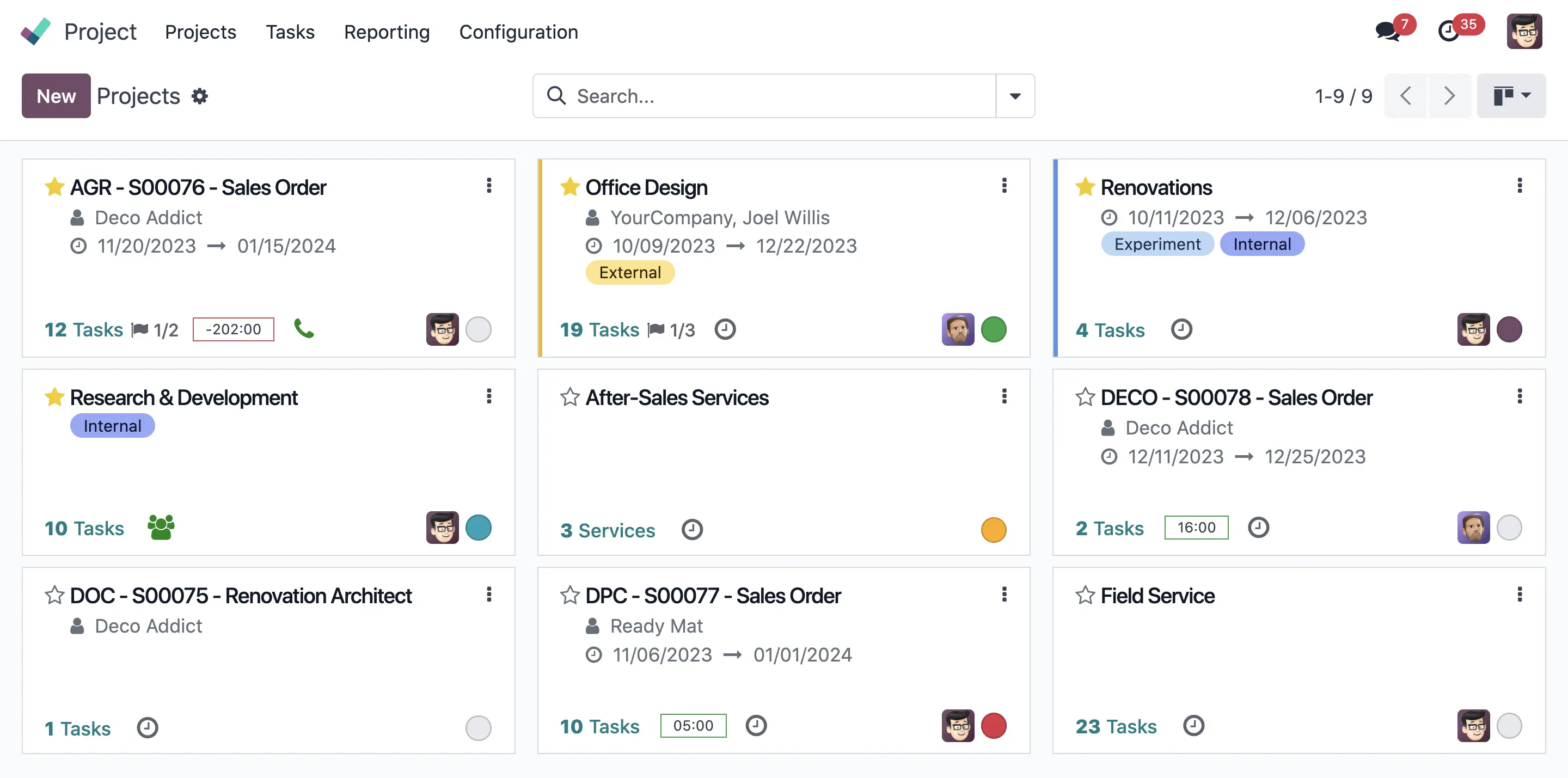
Odoo Project unifies project planning, execution, collaboration, and billing in one place. Tasks are managed on clear Kanban or Gantt boards, everyone knows what to do and when, and progress is visible in real time with no asking around. Timesheets are logged easily — even from a phone — and connect straight to billing, so every billable hour actually makes it onto an invoice. Because projects are unified with Sales and Accounting, cost and revenue are recorded per project, so profitability is clearly visible and decisions rest on data. Collaboration, documents, and communication are centralized on each task, and processes can be standardized via templates for consistent quality. Just as important, the system grows with your business: start from simple task management, then add timesheets, billing, resource planning, and a client portal without switching platforms. Instead of chasing information and fighting fires, the team shifts to planned, collaborative, and measurable execution. Here are the core capabilities.
Visualize task progress on Kanban and project schedules on Gantt, so status, task dependencies, and deadlines read clearly at a glance.
Log team hours easily, even straight from a phone or a timer, and connect them automatically to projects and billing so no billable hour is missed.
Discussions, comments, documents, and updates are centralized on every task, so a project's whole context and history live in one easily accessible place.
Set targets, milestones, and deadlines to keep projects on track, with reminders and markers that help the team prioritize the right work.
Turn logged hours or achieved milestones into client invoices automatically, speeding up billing, cutting leakage, and keeping cash flow healthy.
Monitor cost versus revenue for each project in real time, so you know which projects are profitable and can improve pricing in the future.
Allocate people to tasks and see each member's workload, so scheduling is realistic, load is balanced, and burnout and delay risks drop.
Standardize processes with project templates and stage automation, so every project starts with a proven structure and quality stays consistent across teams.
Give clients access to view progress, documents, and invoices through an online portal, making communication more transparent and cutting repeat status questions.
Store and manage project documents with clear approval flows, so the latest version is always available and key decisions are documented.
Connect projects with after-sales support and field work, so tickets, visits, and tasks are managed in one unified operational flow.
Monitor status, on-time delivery, team utilization, and profitability through real-time reports, helping management decide on data.
Odoo unifies the whole project cycle in one linked flow — from planning and execution to billing and evaluation. Because timesheets, costs, and revenue are recorded against the same project, the picture of progress and profitability is always current with no manual report-building. Each stage can also be simplified for small projects or detailed for large ones involving many parties. Here is a project's journey through the system, from creation to final review, all tailored to your team's way of working and project types.
A project is created with stages that reflect your real process, optionally from a template so every project starts with a consistent, proven structure.
Work is broken into clear tasks, each with an owner, deadline, and priority, so everyone knows what they need to do.
People are allocated to tasks considering existing workload, so scheduling is realistic and no one is over- or under-loaded.
The team works on tasks and logs time easily, even from a phone. Hours connect directly to the project and are ready to bill where relevant.
Discussions, decisions, and key files are centralized on each task, so context is always available and cross-member and cross-team coordination runs smoothly.
Managers track status on Kanban and Gantt in real time, spot blockers early, and adjust priorities before deadlines slip.
Logged hours or achieved milestones are turned into invoices automatically, speeding up billing and ensuring no revenue leaks.
Cost and revenue recorded per project give a clear profitability picture, forming the basis to improve pricing and priorities next time.
Projects close with complete documentation, and lessons learned improve templates and processes for future projects.
This page centers on the Project app, but running projects touches many areas — timesheets, sales, billing, documents, and field service. A sales deal can become a project, hours can become an invoice, and costs can become a profitability record, all without switching apps. Because everything lives in one Odoo database, data flows seamlessly with no costly, fragile cross-system integration, and you can start with project management then add other modules as needs grow with no re-migration. Here are the apps we most often implement together with Project to form complete operations.
The project management core: tasks, stages, Kanban and Gantt, milestones, collaboration, and progress reporting.
Easy time logging from web or mobile, connected to projects and billing.
Resource and shift planning and allocation, helping balance team workload.
Turns deals into projects and contracts and forms the basis for time- or milestone-based billing.
Receives project billing and records cost and revenue for accurate profitability analysis.
Storage and management of project documents with tidy, accessible approval flows.
Manages tickets and support requests that can connect to projects and after-sales service.
Schedules and manages field work, technician visits, and on-site time and material logging.
Real-time project reports and KPIs — status, utilization, and profitability — for teams to management.
Illustrative: a project-based services agency with cross-functional teams
A services agency ran dozens of client projects at once using a mix of spreadsheets, chat, and document folders. Tasks were scattered, so it was unclear who was doing what, and progress was only known through long weekly meetings. Team members rarely logged timesheets diligently, so many hours that should have been billed to clients never made it onto an invoice. Workload was invisible, leaving some overwhelmed while others idled, and at the end of a project no one truly knew whether it was profitable. Time-based billing was often late, squeezing cash flow.
We implemented Odoo Project connected to Timesheets, Sales, and Accounting. Every project now has a clear task board with owners and deadlines, and progress is visible in real time with no long meetings. Timesheets are logged easily from a phone and connect straight to billing, so billable hours no longer leak. Project templates were standardized so every job starts with a consistent structure, resource allocation makes workload visible and more even, and cost and revenue are recorded per project to reveal true profitability. Legacy data was migrated, the team was trained, and we supported them until the new way of working became a habit.
Some of the questions prospective clients ask us most about implementing the Odoo Project & Operations module — from task management, timesheets, and resource planning to billing, project profitability, and the client portal. If yours isn't answered here, our team is happy to help via a free, no-obligation consultation.
Very much so. Odoo Project is built for project-based work like agencies, consultants, and service providers, complete with timesheets, time- or milestone-based billing, and per-project profitability analysis.
Timesheets can be filled easily from web or a mobile app, even using a timer while working on a task. Hours connect directly to the project and are ready to bill to the client where relevant.
Yes. Odoo can turn logged hours or achieved milestones into invoices automatically, so billing is faster, more accurate, and no revenue is missed.
Because cost (including team time) and revenue are recorded against the same project, Odoo shows each project's profitability in real time, helping you spot profitable and loss-making projects early.
Yes. Through resource planning, you can see each member's workload and allocate tasks more evenly, so scheduling is realistic and burnout risk drops.
Yes. Through the client portal, clients can view relevant progress, documents, and invoices, making communication more transparent and cutting repeat status questions.
Discussions, comments, and documents are centralized on each task and project, so all context and history live in one place, easing coordination and onboarding new members.
Yes. You can build project templates with standard stages and tasks, so every new project starts with a consistent structure and doesn't have to be built from scratch.
Yes. Deals in the Sales module can become projects and the basis for billing, so the flow from selling services to execution and billing runs unified with no double entry.
Yes. With the Field Service module, you can schedule visits, log on-site time and materials, and bill them, connected to projects and other operations.
Yes. We help migrate project data, tasks, and important history from old tools or spreadsheets into Odoo, so you start with a complete picture, not from zero.
No. Odoo Project's board-based interface is intuitive, so teams get comfortable quickly. We provide role-based training and support until the new way of working runs smoothly.
Yes. Odoo is built to handle many simultaneous projects, with a combined view that helps management monitor the whole project portfolio from one place.
Our estimate covers both implementation services and the Odoo license for your number of users, with no hidden fees. We explain the breakdown up front so you can budget with certainty.
It depends on process complexity and integrations like billing or field service. After an initial analysis, we provide a clear, measurable timeline so you know when the system will be ready.
As an Odoo Gold Partner, we map your project and operational flow, set up the right templates and processes, configure timesheets and billing, migrate data, train the team, and support you after go-live so the system is genuinely used and delivers results.
Yes. Beyond client work, Odoo can manage internal projects like product development or process improvement, with tasks, timesheets, and cost tracking, even without billing — so internal time allocation stays measurable.
With a combined view of all projects plus status, deadlines, and workload, management can see the portfolio as a whole and decide which projects to prioritize on data, not just on whoever pushes hardest.
Yes. Task deadlines and activities can appear on the calendar, and together with the Planning module, schedules and team allocation become clearer and easier to coordinate across members.
Odoo supports subtasks and task dependencies, so large work can be broken into manageable pieces, with order and progress staying clear on both Kanban and Gantt views.
Yes. By recording cost and revenue per project and comparing against plan, Odoo helps you monitor whether a project is still on budget and gives an early warning when it starts to slip.
Odoo sets access per role and per project, so members only see projects relevant to them, while sensitive data like profitability is visible only to authorized parties.
Yes. Odoo's Kanban boards suit Agile workflows, where tasks move between stages and sprints can be managed visually. Teams can adapt the stages to the methodology they use.
Being web- and mobile-based, the whole team can access projects, log timesheets, and collaborate from anywhere. All context is centralized on each task, so remote-team coordination stays clear and effective.
Get a free consultation for your needs. We'll help map out the right modules and give you a clear cost estimate — no commitment.